


ROLE
Product Designer.
TOOLS
Figma, Spline, Anima, Photoshop, Illustrator.
CLIENT
Vancouver Film School,
Graduation Project.
DURATION
2024.
interativo
A gamified way to learn and explore art galleries.
In an age where technology keeps evolving and becoming more accessible, today’s younger generations have grown up with interactive and immersive technologies, which offer constant stimulation and engagement. This makes traditional, passive experience of merely observing less appealing to them.
Art galleries often does not keep up pace with technological advancements, becoming less attractive and engaging to younger generations.
PROJECT SCOPE
Create a high-level product concept to address the lack of engagement in art galleries, focusing on attracting a wider audience.
DELIVERABLES
Develop research reports, conduct primary, secondary, and exploratory research, synthesis and build a high level prototype.
BACKGROUND
Art has been a significant part of human’s lives for centuries, as a source of timeless expressions.
It serves as a historical record, documenting events and culture, helping us understand our past and shape our perceptions of the present and future.
PROBLEM
While working at an art gallery, I have seen many visitors leave less than half an hour after purchasing their tickets.
In an age where technology keeps evolving and becoming more accessible, today’s younger generations have grown up with interactive and immersive technologies, which offer constant stimulation and engagement. This makes traditional, passive experience of merely observing less appealing to them.
MY ASK
How might we create a more engaging and interactive way to see art pieces, so that visitors can feel welcomed and entertained about the art?
RESEARCH SUMMARY
Research Methods
PRIMARY RESEARCH
Interviews, Field Studies and Concept Validation Testing.


SECONDARY RESEARCH
Competitive Analysis
SYNTHESIS
Affinity Mapping, Archetype, Experience Map, Journey Map, and Hi-Fi Concept Development.


"I was told to not touch anything, so I just look at them really."
- Interviewee 03

"I’m the type of gallery visitor to read each and every single text panel found in the exhibition space. When I first go to an exhibition, I try to follow the chronological order in viewing each piece to have a better understanding of the artist and curator’s intention for the show. Then if I really like specific artworks, I’ll go back to them before leaving the space."
- Interviewee 01
KEY FINDINGS #1
Users have different ways of engaging with art, but passive observation is the most common one.
When asked how they interact within the exhibition space, the predominant answer was "I just look at them". In the other hand, some users demonstrated to have a specific process while inside of the exhibit space.
Also, with the many rules in the gallery space in order to uphold the integrity of expensive artworks, it is definitely a barrier for users who feel the need to look, feel, see art closer to have a better understanding.
KEY FINDINGS #2
Users past experiences often described as boring, highlighting a significant lack of engagement.
87.5% of the interviewees mentioned leaving the art galleries with a frustration of not understanding art works.

"The last time I visited an art gallery was around two years ago, I saw an ad on TikTok promoting to be free one day of the week, so I invited a friend to give it a try.
We couldn't understand the meaning of the pieces, so we just took some photos and left. It was boring so I never visited again"
- Interviewee 05

"Personally, I find it challenging to understand photographic works the most, they tend portrait abstract concepts like emotions, so it is subject.
Art galleries also tend to be quite vague with their text panel descriptions so sometimes artworks will only have its title+ date made + medium/materials used and no other information."
- Interviewee 01

"Some are harder than others. Art style wise, abstract pieces are challenging for me, as most of them has a lot of depth and require a deep understanding of art, which I don't have."
- Interviewee 08
KEY FINDINGS #3
100% of interviewees reported challenging to understand art depending on it's style.
Abstract Art, for example, it often conveys emotions and ideas through non-traditional compositions, which lacks straightforward narratives. This can make it difficult for viewers to interpret the artist's intentions and connect with the artwork on a personal level.
KEY FINDINGS #4
Users struggle to navigate around inside of the gallery, leading to confusion.
Art galleries typically adopt a minimalistic approach, often lacking clear guidance, which makes it difficult for visitors to navigate.

"Bigger art institutions like Museum of Fine Arts Montreal could be intimidating and overwhelming. It’s mostly because there’s too many exhibition spaces and it can be difficult to navigate around, since they tend to be vague."
- Interviewee 01
Breaking Down the Discovery Flow
I began by conducting interviews and transformed the collected data into key data points. Using these, I created an affinity diagram, followed by an empathy map to understand the visitors' emotional journey. This led to the development of an archetype.
ARCHETYPE
To better understand my target user, I developed an archetype based on the data I collected and organized previously. The affinity diagram I performed was extremely important to map the user's needs, motivations, frustrations, thoughts and feelings.
I learned previously how to use archetypes instead of personas, highlighting more relevant information to the design process, such as their goals, jobs to be done, paint points and delighters. So I decided to continue with this approach.

Mapping the Journey
To gain a comprehensive understanding of visitors' behaviors and challenges within art galleries, I created a user journey map based on the data collected previously. By focusing on key stages such as considering, arrival, exploration, lack of understanding, boredom, and frustration, I identified critical pain points and opportunities to improve visitors' experience.

PAIN POINTS
Hard Time Understanding Artworks.
Concerns About Engagement.
Lack Of Connection Between Visitor and Artwork.
Complicated Wayfinding.
Creating the journey map showed me that an experience can start exciting but can quickly become frustrated if they feel confused. I also realized how crucial it is to keep people engaged, especially families with kids, to prevent boredom. Overall, it helped me to focus on both the practical and emotional aspects of the users visit.
Understanding My Opportunities
I developed a mental model based on my data and previous research methods. By analyzing this model, I pointed major opportunities for improvement.
MENTAL MODEL
A gamified interactive app framework for art galleries to improve visitors engagement and understanding through educational and entertaining modules.
The mental model taught me how to understand a person's thought process and the importance of seeing things from multiple perspectives. It was important to represent visually my areas of opportunities compared to the existing solutions.

Design Principles
CONTEXTUAL LEARNING
Use storytelling and scenarios to provide context, making abstract concepts more relatable and easier to understand.
EDUCATIONAL TOOL
Provide explanations of artworks, including information on artistic techniques, historical context, and cultural significance.
FEEDBACK LOOP
Provide immediate feedback to help users understand the consequences of their actions and motivate continued engagement and learning.
ACCESSIBLE INFORMATION
Provide information in layers, so visitors can access the level of detail they need without feeling overwhelmed.
Navigation and IA
To understand better how the Information Architecture should be, I did a mapping of the content the user would have access throughout the steps.

Ideation, Flow Mapping and Wireframing
I started sketching ideas for how to meet the identified needs mentioned previously. With a framework in mind, I had several versions (total of 4), I created a mid-fidelity prototype representation of my design using Figma.
One of my biggest struggles were finding the right navigation system. At first, I tried to innovate due to the immersion by having a expandable bottom nav bar, but I noticed it was not intuitive at all for the users.
I could also notice I was not giving the right importance to the game, one of my biggest selling points.
Low Fidelity Wireframes


Mid Fidelity Prototype
User Testing, A/B Testing and Iterations
MODERATED USER TESTING
I conducted two rounds of usability test, first with 4 users, then with 10. It was good to gain a better understanding of the needs of my solution, but also to validate the usability of my prototype.
For the testing, I had tasks users needed to perform related to: Finding Information, Accessing and Viewing and Playing a game
WHAT WORKED WELL

Users could find the requested information within two clicks.


Highlight the most important information of each module helped users recall easily the correct answer.

The additional information after answering the questions seemed to be a good addition as it was highly complimented.

The game was straightforward and intuitive. Users could easily understand how the game worked and play along.

OPPORTUNITIES TO IMPROVE

When asked to find their achievements, most users got confused and clicked everywhere else than the hamburger menu.
To address this issue, I decided to fix the side bar and just have it as a hamburger menu during game, to give a better immersion.
Additionally, I decided to hide the user name and points from the lobby as it did not seem to be an extremely important information.


I could notice users losing connection with the solution in pages with a larger amount of white space.
I decided to explore more visual elements to keep engagement. Add more visual elements related to the art or artist at the overview page, and to the game map as well, were some of the opportunities I could notice.

A/B Testing
During the user testing, I performed an A/B testing to measure the engagement, time spent and overall performance completion rates of users with two different variants of the content page prior the game.
A) A colorful background which could be more engaging and appealing.
B) A white background that could emphasize the content and reduce clutter.
TIME SPENT ON PAGE
Users spent an average of 14 seconds longer engaging with the colorful variant .
Users spent an average of 63.71 seconds on the colorful variant, compared to 49.09 seconds on the white variant. This increased time on page suggested me that the colorful background may be more effective in maintaining the user attention.

"I liked how the background color matched the painting. I noticed that the important text was highlighted in bold, it helped me to identify what I should remember."
- Participant 02

"The colors helped me identify the division of the content. And while answering the questions, I could assimilate the background color with the right answer."
- Participant 01
GAME SCORE
The colorful variant yielded a 79% higher game score average than the white variant.
The colorful variant also demonstrated a higher game score average, with users scoring 3.14 out of 4 on average, compared to 1.75 out of 4 for the white variant, this represents a 79% higher game score average. These results suggested me that the colorful background not only engages users more but also enhanced their performance in the game.
THE TIP OF THE ICEBERG
Color blindness didn't stop a user from excelling with the colorful variant, but highlighted the need for more inclusive design and additional testing.
During the testing, I received an important accessibility insight. The last participant, who is color blind, initially tested the colorful variant and scored a perfect 4 out of 4, spending 1 minute and 4.65 seconds on the page.
After identifying his condition, I had him repeat the test with the white variant. He spent 53.13 seconds, less than with the colorful variant, and while talking more to the user, I could conclude he spent more time on the colorful variant because it was harder to concentrate with the colors on the background. He still scored 4 out of 4, but comparing the performance isn't entirely fair since he was already familiar with the questions and answers from the first try.
I could conclude the design may still be accessible to some users with color vision deficiencies.

"The colors were overstimulating me and it was hard to track the letters as I was reading, I was also getting distracted by the colorful imagery around it.
In comparison with the white background it was easier to read the word and perceive the ideas in my head.
It was not drastically harder, I was still able to understand the content, I just had to put more focus on the words."
- Participant 10
FINAL DECISION
Due to the constraints of the deadline, I decided to substitute the usage of highly saturated colors, and instead, use Pastel Colors, with higher lightness contrast, making it easier for colorblind users to distinguish between different elements.
However, I found necessary to conduct further testing with more participants who have similar conditions to determine if more in depth adjustments are needed.
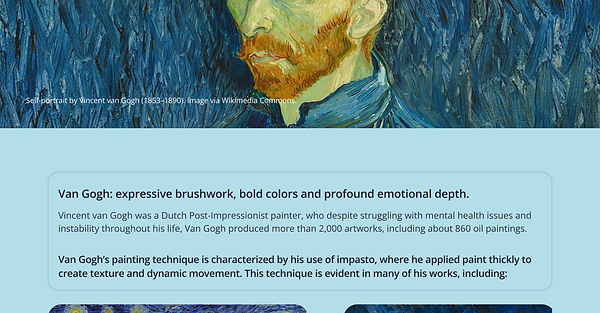

Final UI and Design Decisions
The user testing was extremely crucial for me to validate my design and allow me to improve. With the users feedback, I made the necessary improvements and got to the final UI.
INFORMATION
Hamburger menu to provide easy navigation options without cluttering the interface.
Removed Search Bar and used Tabs to layer content.
GAME LOBBY
Removed expandable navigation bar as users did not understand how to use it.
Fixed side bar as user did not seem to intuitively click to explore the library and rank pages.
Removed Points, Rank and Username from Lobby as it did not seem to be extremely important.
Added illustrations to the background to make it more visually appealing.

Evaluation and reflection
Coming soon...
